
Cargo light

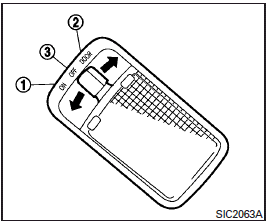
The cargo light on the overhead trim has a threeposition switch. To operate, push the switch to the desired position.
1 ON: The light is illuminated.
2 DOOR: The light illuminates when the liftgate is opened. The light turns off when the liftgate is closed.
3 OFF: The light does not illuminate regardless of liftgate position or lock status.
CAUTION
Do not use for extended periods of time with the engine stopped. This could result in a discharged battery.
See also:
Rear-facing child restraint installation using the seat belts
WARNING
The three-point seat belt with Automatic Locking Retractor (ALR) must be used when installing a child restraint. Failure to use the ALR mode will result in the child restraint not being p ...
Repair and replacement procedure
The front air bags, side air bags, curtain
and rollover air bags and pretensioners are
designed to activate on a one-time-only
basis. As a reminder, unless it is damaged,
the supplemental air ...
Removing spots
Remove tar and oil spots, industrial dust,
insects, and tree sap as quickly as possible
from the paint surface to avoid lasting
damage or staining. Special cleaning
products are available at a ...