
Locking with key

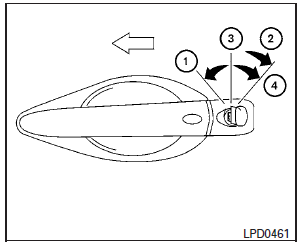
Driver’s side
The power door lock system allows you to lock or unlock all doors at the same time.
Turning the key toward the front 1 of the vehicle locks all doors.
Turning the key one time toward the rear 2 of the vehicle unlocks that door. From that position, returning the key to neutral 3 (where the key can only be removed and inserted) and turning it toward the rear again within 5 seconds unlocks all doors 4 .
Opening and closing windows
The driver’s door key operation allows you to open and close windows equipped with automatic operation at the same time.
● To open the windows, turn the driver’s door key toward the rear of the vehicle for longer than 1 second after the door is unlocked.
● To close the windows, turn the driver’s door key toward the front of the vehicle for longer than 1 second after the door is locked.
Windows stop when the key cylinder is released.
NOTE:
When the window lock button is pressed the key will not operate the window open or close function.
See also:
Environmental factors influence the rate of corrosion
Moisture
Accumulation of sand, dirt and water on
the vehicle body underside can accelerate
corrosion. Wet floor coverings will not dry
completely inside the vehicle, and should
be removed for ...
Let’s Practice
Let’s Practice
This mode helps learn how to use the INFINITI Voice Recognition system.
1. Select the “Let’s Practice” key.
2. After the message screen appears, push the TALK switch on the steerin ...
Valet hand-off
When you have to leave a key with a valet, give them the Intelligent Key itself and keep the mechanical key with you to protect your belongings.
To prevent the glove box or console box from being o ...