
Tilt/telescopic steering
 WARNING
► Do not adjust the steering wheel while
driving. You could lose control of your
vehicle and cause an accident.
► Do not adjust the steering wheel any
closer to you than is necessary for
proper steering operation and comfort.
The driver’s air bag inflates with great
force. If you are unrestrained, leaning
forward, sitting sideways or out of
position in any way, you are at greater
risk of injury or death in a crash. You
may also receive serious or fatal injuries
from the air bag if you are up against it
when it inflates. Always sit back against
the seatback and as far away as practical
from the steering wheel. Always use the
seat belts.
Electric operation
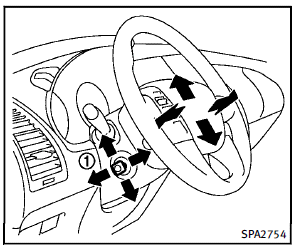
Tilt or telescopic operation
Move the lever 1 to adjust the steering wheel up or down, forward or rearward to the desired position. Entry/Exit function operation: The automatic drive positioner system will make the steering wheel move up automatically when the driver’s door is opened with the ignition switch in the LOCK position. This lets the driver get into and out of the seat more easily. For more information, see “Automatic drive positioner” later in this section.
See also:
Spark plugs
WARNING
Be sure the engine and the ignition switch are off and that the parking brake is engaged securely.
CAUTION
Be sure to use the correct socket to remove the spark plugs. An incorrect socket c ...
Break-in schedule
CAUTION
During the first 1,200 miles (2,000 km),
follow these recommendations to obtain
maximum engine performance and ensure
the future reliability and economy of your
new vehicle.
Fail ...
Read first — then drive safely
Before driving your vehicle, read your
Owner’s Manual carefully. This will ensure
familiarity with controls and maintenance
requirements, assisting you in the safe
operation of your vehicle.
...