
During a call

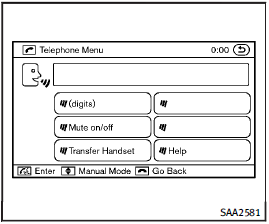
During a call
During a call there are several command options available. Press the
 button on the steering wheel to mute the receiving voice and enter commands.
• “(digits)” — Use the Send command to enter numbers during a call. For example, if directed to dial an extension by an automated system: Speak: “Sending one two three four.” The system acknowledges the command and sends the tones associated with the numbers. The system then ends the VR session and returns to the call.
• “Mute on/off” — Use the Mute command to mute the user’s voice so the other party cannot hear it.
Use the mute command again to unmute the user’s voice.
• “Transfer Handset” — Use the Transfer Handset command to transfer the call from the Bluetooth® Hands-Free Phone System to a cellular phone when privacy is desired. The system announces, “Transfer Handset. The call is transferred to the handset only.” The system then ends the VR session.
The Transfer Call command can also be issued again to return to a hands-free call through the vehicle.
• “Help” — The system announces the available commands.
NOTE:
If the other party ends the call or the cellular phone network connection is lost while the Mute feature is on, the Mute feature may need to be reset to “off.”
See also:
Glass
Use glass cleaner to remove smoke and dust film from the glass surfaces. It is normal for glass to become coated with a film after the vehicle is parked in the hot sun. Glass cleaner and a soft cloth ...
Waxing
Regular waxing protects the paint surface and helps retain new vehicle appearance.
Polishing is recommended to remove builtup wax residue and to avoid a weathered appearance before reapplying wax.
A ...
Voice commands
You can use voice commands to operate various Bluetooth® Hands-Free Phone System features using the INFINITI Voice Recognition system.
For more details, see “INFINITI Voice Recognition system (models ...