
Recent Calls

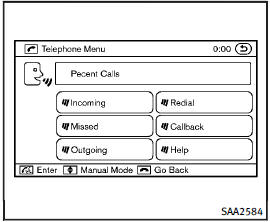
• Incoming
Use the Incoming command to make a call viewing the list of incoming calls.
• Missed
Use the Missed command to make a call viewing the list of missed calls.
• Outgoing
Use the Outgoing command to make a call viewing the list of outgoing calls.
• Redial
Use the Redial command to dial the last outgoing call.
• Callback
Use the Callback command to dial the last incoming call.
• Help
The system announces the available commands.
See also:
FX in the Market
Off-road SUVs proliferated before their numbers thinned, leaving healthy
demand for stalwarts like Jeep. Conversely, SUVs designed primarily for on-road
sport, like the FX, didn't become a signifi ...
Before starting
To get the best recognition performance from Voice Recognition, observe the following:
● The interior of the vehicle should be as quiet as possible. Close the windows to eliminate the surroun ...
Operating manual lift gate
To open the lift gate, unlock it and push the
lift gate opener switch A . Pull up the lift
gate to open.
The lift gate can be unlocked by:
► pushing the unlock button on the
Intellig ...