
Locking doors
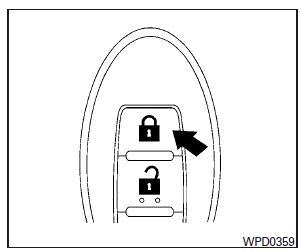
1. Place the ignition switch in the LOCK position.
2. Close all doors.
3. Press the  button on the
Intelligent Key.
button on the
Intelligent Key.
4. The hazard warning lights flash twice and the horn beeps once.
5. All doors will be locked.
CAUTION
After locking the doors using the Intelligent Key, be sure that the doors have been securely locked by operating the door handles.
See also:
How to use the INFO button
Press the INFO button. The display screen shows vehicle information for your convenience.
The information shown on the screen should be a guide to determine the condition of the vehicle.
See t ...
Opening windows
The UNLOCK button operation also allows you to open the window that is equipped with the automatic open/close function. (See “Power windows”).
To open the window, push the door UNLOCK button
2 on ...
USB input operation (if so equipped)
USB input operation (if so equipped)
Audio main operation
Open the console lid and connect a USB memory 1 as illustrated. Then, push the DISC·AUX or AUX button repeatedly to switch to the USB memo ...