
Compressed Video Files (models withNavigation System)

Explanation of terms:
● DivX – DivX refers to the DivX codec owned by Div, Inc. used for a lossy compression of video based on MPEG-4.
● AVI – AVI stands for Audio Video Interleave.
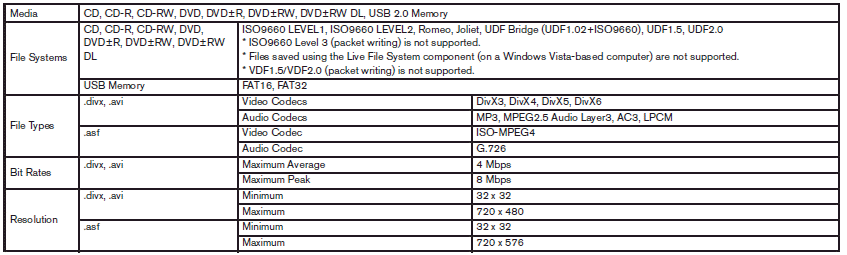
It is standard file format originated by Microsoft Corporation. A .divx encoded file can be saved into the .avi file format for playback on this system if it meets the requirements stated in the table in this section. However, all .avi files are not playable on this system since different encodings can be used other than the DivX codec.
● ASF – ASF stands for Advanced Systems Format. It is a file format owned by Microsoft Corporation. Note: Only .asf files that meet the requirements stated in the table in this section can be played.
● Bit rate — Bit rate denotes the number of bits per second used by a digital video files.
The size and quality of a compressed digital audio file is determined by the bit rate used when encoding the file.
Requirements for Supporting Video Playback:
See also:
Towing recommended by INFINITI
Two-Wheel Drive (2WD) models
INFINITI recommends that your vehicle be
towed with the driving (rear) wheels off the
ground or place the vehicle on a flat bed
truck as illustrated.
CAUTION
...
How to use INFINITI controller
Choose an item on the display by rotating
or pushing the center dial 1 upward/
downward, and push the ENTER button 2
for operation.
If you push the BACK button3 before the
setup is complet ...
Coupe (except for INFINITI Performance Line, Aerodynamic Package models)
1. Park the vehicle on flat, level ground.
2. Locate the center position indicator A on the lower part of the grille. Measure straight down from the edge where the bumper and grille meet to the ali ...