
Approach warning

If your vehicle comes closer to the vehicle ahead due to rapid deceleration of that vehicle or if another vehicle cuts in, the system warns the driver with the chime and ICC system display.
Decelerate by depressing the brake pedal to maintain a safe vehicle distance if:
● The chime sounds.
● The vehicle ahead detection and set distance indicator blink.
The warning chime may not sound in some cases when there is a short distance between vehicles.
Some examples are:
● When the vehicles are traveling at the same speed and the distance between vehicles is not changing
● When the vehicle ahead is traveling faster and the distance between vehicles is increasing
● When a vehicle cuts in near your vehicle The warning chime will not sound when:
● The vehicle approaches other vehicles that are parked or moving slowly.
● The accelerator pedal is depressed, overriding the system.
NOTE:
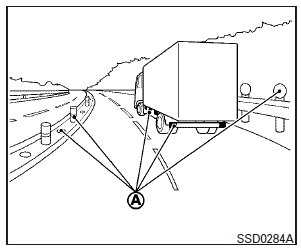
The approach warning chime may sound and the system display may blink when the ICC sensor detects objects on the side of the vehicle A or on the side of the road A .
This may cause the ICC system to decelerate or accelerate the vehicle. The ICC sensor may detect these objects when the vehicle is driven on winding roads, narrow roads, hilly roads, or when entering or exiting a curve. In these cases you will have to manually control the proper distance ahead of your vehicle.
Also, the sensor sensitivity can be affected by vehicle operation (steering maneuver or driving position in the lane) or traffic or vehicle condition (for example, if a vehicle is being driven with some damage).
See also:
Connect Phone
• Add Phone
Use the Pair Phone command to connect a compatible phone to the Bluetooth ® Hands-Free Phone System.
When asked to enter a PIN code to connect a Bluetooth® cellular phone, enter the co ...
Playing Digital Versatile Disc (DVD)
DISC·AUX button
Park the vehicle in a safe location for the
front seat occupants to operate the DVD
player while watching the images.
Insert a DVD into the CD/DVD slot with the
labeled side ...
Larger children
Children who are too large for child
restraints should be seated and restrained
by the seat belts which are provided. The
seat belt may not fit properly if the child is
less than 4 ft 9 in (14 ...