
Vehicle load capacity

Do not exceed the load limit of your vehicle shown as “The combined weight of occupants and cargo” on the Tire and Loading Information label. Do not exceed the number of occupants shown as “Seating Capacity” on the Tire and Loading Information label.
To get “the combined weight of occupants and cargo”, add the weight of all occupants, then add the total luggage weight. Examples are shown in the following illustration.
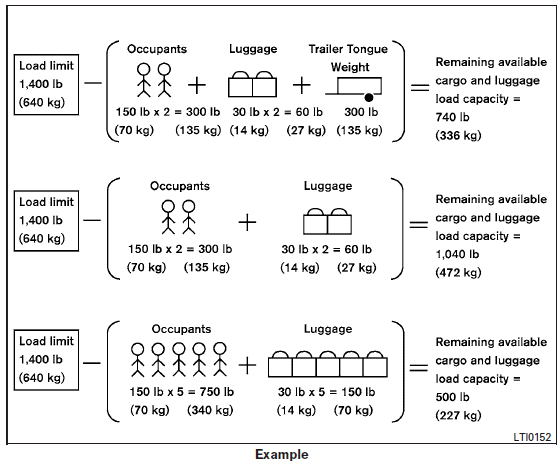
Steps for determining correct load limit
1. Locate the statement “The combined weight of occupants and cargo should never exceed XXX lbs or XXX kg” on your vehicle’s placard.
2. Determine the combined weight of the driver and passengers that will be riding in your vehicle.
3. Subtract the combined weight of the driver and passengers from XXX lbs or XXX kg.
4. The resulting figure equals the available amount of cargo and luggage load capacity. For example, if the XXX amount equals 1,400 lbs. and there will be five 150 lb. passengers in your vehicle, the amount of available cargo and luggage load capacity is 650 lbs. (1,400-750 (5 X 150) = 650 lbs) or (640-340 (5 X 70) = 300 kg.)
5. Determine the combined weight of luggage and cargo being loaded on the vehicle. That weight may not safely exceed the available cargo and luggage load capacity calculated in Step 4.
6. If your vehicle will be towing a trailer, load from your trailer will be transferred to your vehicle. Consult this manual to determine how this reduces the available cargo and luggage load capacity of your vehicle.
Before driving a loaded vehicle, confirm that you do not exceed the Gross Vehicle Weight Rating (GVWR) or the Gross Axle Weight Rating (GAWR) for your vehicle.
See “Measurement of weights” later in this section.
Also check tires for proper inflation pressures.
See the Tire and Loading Information label.
See also:
Entry/exit function
This system is designed so that the driver’s
seat and steering column will automatically
move when the automatic transmission
selector lever is in the P (Park)
position. This allows the driver ...
Precautions on vehicle-to-vehicle distance control mode
The system is intended to enhance the operation of the vehicle when following a vehicle traveling in the same lane and direction.
If the distance sensor A detects a slower moving vehicle ahead, t ...
How to use brightness control and display ON/OFF button
HOW TO USE BRIGHTNESS CONTROL
AND DISPLAY ON/OFF BUTTON
Push the button to switch the
display brightness to the daytime mode or
the nighttime mode, and to adjust the
display brightness usin ...