
Instrument panel

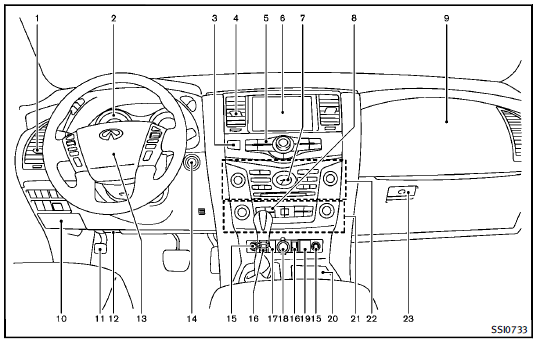
1. Side ventilator (P.4-32)
2. Meters and gauges (P.2-6)
3. Hazard warning flasher switch (P.2-43)
4. Center ventilator (P.4-32)
5. Center multi-function control panel
(P.4-4)
— Vehicle information and setting
buttons (P.4-8)
6. Center display
— Around View Monitor (P.4-21)
— Navigation system
— DVD player operation (P.4-56)
7. Clock (P.2-51)
8. Defroster switch (P.2-36)/Deicer
switch (P.2-36)
9. Front passenger supplemental air bag
(P.1-54)
10. Fuse box (P.8-24)
11. Parking brake (P.5-20)
12. Hood release handle (P.3-18)
13. Steering wheel
— Horn (P.2-45)
— Driver supplemental air bag
(P.1-54)
— Power steering system (P.5-101)
14. Push-button ignition switch (P.5-11)
15. Climate controlled seat switch
(P.2-47)/Heated seat switch (P.2-45)
16. Remote tip-up 2nd row seat switch
(P.1-9)
17. Heated steering wheel switch (P.2-44)
18. Power outlet (P.2-52)
19. Front passenger air bag status light
(P.1-62)
20. Cup holder (P.2-54)
21. Automatic climate control system
(P.4-33)
22. Audio system (P.4-41)
23. Glove box (P.2-57)
See also:
Getting the spare tire and tools
Jacking tools — Sedan
Jacking tools — Coupe
Spare — Sedan and Coupe
Raise the trunk floor cover 1 using the tab A .
Remove jacking tools located inside the trunk as illustrated.
The spare t ...
Hood
1. Pull the hood lock release handle 1
located below the instrument panel;
the hood will then spring up slightly.
2. Pull the lever 2 up at the front of the
hood with your fingertips and rai ...