
Locking with inside lock knob

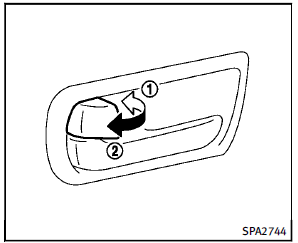
To lock the door individually, move the inside lock knob to the lock position 1 . To unlock, move the inside lock knob to the unlock position 2 .
Be sure not to leave the Intelligent Key inside the vehicle.
See also:
Music Box® (if so equipped)
The Music Box® audio system can store
songs from CD being played. The system
has a 9.3 gigabyte (GB) storage capacity.
The following CDs can be recorded in the
Music Box® audio system.
υ ...
Bluetooth® settings (models with navigation system)
For details of the “Bluetooth®” settings, see “Bluetooth® Hands-Free Phone System (models with navigation system)”. ...
E-85 fuel
E-85 fuel is a mixture of approximately 85% fuel ethanol and 15% unleaded gasoline. E-85 can only be used in a Flexible Fuel Vehicle (FFV). Do not use E- 85 fuel in your vehicle. U.S. government regul ...