
Tilt/telescopic steering

 WARNING
► Do not adjust the steering wheel while
driving. You could lose control of your
vehicle and cause an accident.
► Do not adjust the steering wheel any
closer to you than is necessary for
proper steering operation and comfort.
The driver’s air bag inflates with great
force. If you are unrestrained, leaning
forward, sitting sideways or out of
position in any way, you are at greater
risk of injury or death in a crash. You
may also receive serious or fatal injuries
from the air bag if you are up against it
when it inflates. Always sit back against
the seatback and as far away as practical
from the steering wheel. Always use the
seat belts.
Electric operation
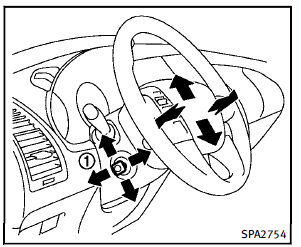
Tilt or telescopic operation
Move the lever 1 to adjust the steering wheel up or down, forward or rearward to the desired position. Entry/Exit function operation: The automatic drive positioner system will make the steering wheel move up automatically when the driver’s door is opened with the ignition switch in the LOCK position. This lets the driver get into and out of the seat more easily. For more information, see “Automatic drive positioner” later in this section.
See also:
Safety
The FX comes standard with seat-mounted side airbags for the front passengers
and side curtain airbags for both rows. Active head restraints are standard for
both rows; most of today's vehicles wi ...
Infants
Infants up to at least 1 year old should be placed in a rear-facing child restraint. INFINITI recommends that infants be placed in child restraints that comply with Federal Motor Vehicle Safety Standa ...
How to use the STATUS button
The STATUS button is used to display system information. Three different split screens of information are available. Press the STATUS button multiple times to cycle through these screens as follows:
...