
Parking/parking on hills
 WARNING
► Do not stop or park the vehicle over
flammable materials such as dry grass,
waste paper or rags. They may ignite and
cause a fire.
► Never leave the engine running while the
vehicle is unattended.
► Do not leave children unattended inside
the vehicle. They could unknowingly
activate switches or controls. Unattended
children could become involved
in serious accidents.
► Safe parking procedures require that
both the parking brake be applied and
the transmission be placed in the P
(Park) position. Failure to do so could
cause the vehicle to move unexpectedly
or roll away and result in an accident.
► Make sure the automatic transmission
selector lever has been pushed as far
forward as it can go and cannot be
moved without depressing the foot
brake pedal.
2. Move the selector lever to the P (Park)
position.
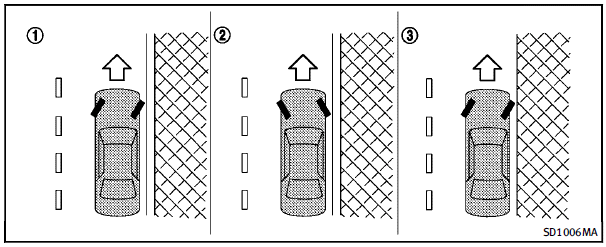
3. To help prevent the vehicle from rolling
into the street when parked on a
sloping drive way, it is a good practice
to turn the wheels as illustrated.
► HEADED DOWNHILL WITH CURB: 1
Turn the wheels into the curb and move
the vehicle forward until the curb side
wheel gently touches the curb.
► HEADED UPHILL WITH CURB: 2
Turn the wheels away from the curb and
move the vehicle back until the curb
side wheel gently touches the curb.
► HEADED UPHILL OR DOWNHILL, NO
CURB: 3
Turn the wheels toward the side of the
road so the vehicle will move away from
the center of the road if it moves.
4. Push the ignition switch to the OFF
position.
See also:
Cleaning exterior
In order to maintain the appearance of your vehicle, it is important to take proper care of it.
To protect the paint surfaces, please wash your vehicle as soon as you can:
● after a rainfa ...
Dot matrix liquid crystal display
The dot matrix liquid crystal display
appears in the vehicle information display
1 located between the speedometer and
odometer, and shows the indicators for the
driving systems, Intelligent ...
Bluetooth® Audio player (models with navigation system)
• Some Bluetooth® audio devices may not be recognized by the in-vehicle audio system.
• It is necessary to set up the wireless connection between a compatible Bluetooth ® audio device and the in-vehi ...