
Passenger compartment
 CAUTION
Never use a fuse of a higher or lower
amperage rating than that specified on the
fuse box cover. This could damage the
electrical system or cause a fire.
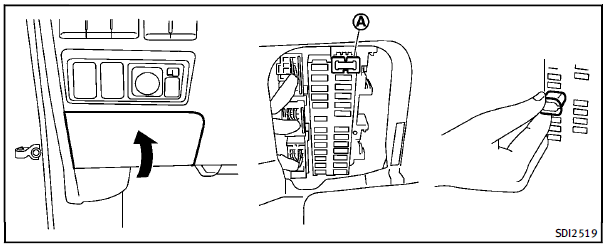
If any electrical equipment does not operate, check for an open fuse. 1. Be sure the ignition switch is pushed to the OFF or LOCK position and the headlight switch is turned to OFF. 2. Open the fuse box lid. 3. Remove the fuse with the fuse puller A . 4. If the fuse is open, replace it with a new fuse. 5. If a new fuse also opens, have the electrical system checked and repaired by an INFINITI retailer. Spare fuses are stored in the fuse box.
Extended storage switch (if so equipped)
To reduce battery drain, the extended storage switch comes from the factory switched off. Prior to delivery of your vehicle, the switch is pushed in (switched on) and should always remain on. If any electrical equipment does not operate, remove the extended storage switch and check for an open fuse.
NOTE:
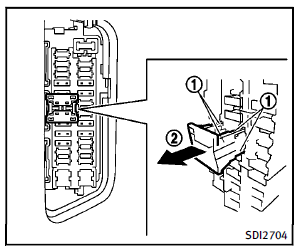
If the extended storage switch malfunctions or if the fuse is open, it is not necessary to replace the switch. In this case, remove the extended storage switch and replace it with a new fuse of the same rating. How to remove the extended storage switch:
1. To remove the extended storage switch, be sure the ignition switch is in the OFF or LOCK position. 2. Be sure the headlight switch is in the OFF position. 3. Remove the fuse box cover. 4. Pinch the locking tabs 1 found on each side of the storage switch. 5. Pull the storage switch straight out from the fuse box 2 .
See also:
Troubleshooting guide
The system should respond correctly to all voice commands without difficulty.
If problems are encountered, try the following solutions.
Where the solutions are listed by number, try each solution i ...
Speedometer and odometer
Speedometer
The speedometer indicates vehicle speed.
Odometer/Twin trip odometer
The odometer 1 and the twin trip odometer 2 are displayed below the Vehicle Information Display when the ignition ...
Approach warning
If your vehicle comes closer to the vehicle ahead due to rapid deceleration of that vehicle or if another vehicle cuts in, the system warns the driver with the chime and ICC system display. Decelerate ...