
Lights

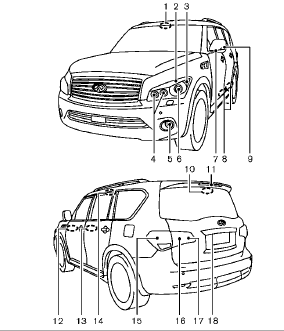
1. Map light
2. Parking light
3. Front side marker light
4. Front turn signal light
5. Fog light
6. Headlight (high-beam, low-beam)
7. Puddle light
8. Step light
9. Side turn signal light
10. Cargo light
11. High-mounted stop light
12. Front armrest light
13. Rear armrest light
14. Rear personal light
15. Rear combination light (tail/stop/turn
signal/side marker light)
16. Tail light
17. Back-up light
18. License plate light
See also:
Relative humidity
Corrosion will be accelerated in areas of high relative humidity, especially those areas where the temperatures stay above freezing where atmospheric pollution exists, or where road salt is used. ...
Windshield-washer fluid reservoir
Fill the windshield-washer fluid reservoir periodically.
Add windshield-washer fluid when the low windshield-washer fluid warning light comes on.
To fill the windshield-washer fluid reservoir, ...
Getting the spare tire and tools
Jacking tools — Sedan
Jacking tools — Coupe
Spare — Sedan and Coupe
Raise the trunk floor cover 1 using the tab A .
Remove jacking tools located inside the trunk as illustrated.
The spare t ...