
Door locks/unlocks precaution

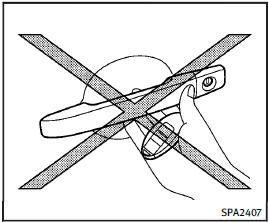
Door locks/unlocks precaution
• Do not push the door handle request switch with the Intelligent Key held in your hand as illustrated. The close distance to the door handle will cause the Intelligent Key system to have difficulty recognizing that the Intelligent Key is outside the vehicle.
• After locking with the door handle request switch, verify the doors are securely locked by testing them.
• To prevent the Intelligent Key from being left inside the vehicle or the trunk, make sure you carry the key with you and then lock the doors or the trunk.
• Do not pull the door handle before pushing the door handle request switch. The door will be unlocked but will not open. Release the door handle once and pull it again to open the door.
• The Intelligent Key system (opening/ closing doors with the door handle request switch) can be set to remain inactive. (See “Vehicle information and settings”.)
See also:
Armrest (if so equipped)
Front seats
Front seats
The console box lid can be used as an
armrest.
Slide the box lid forward or backward to
the desired position (if so equipped).
2nd row seat
2nd row seat
Pu ...
F.M.V.S.S./C.M.V.S.S. certification label
The Federal/Canadian Motor Vehicle Safety
Standards (F.M.V.S.S./C.M.V.S.S.) certification
label is affixed as shown. This label
contains valuable vehicle information, such
as: Gross Vehicle ...
Seat belts with pretensioners (front seats)
WARNING
• The pretensioners cannot be reused after activation. They must be replaced together with the retractor and buckle as a unit.• If the vehicle becomes involved in a collision but a pretension ...