
Head restraints (1st row only)

WARNING
Head restraints supplement the other vehicle safety systems. They may provide additional protection against injury in certain rear end collisions. Adjust the head restraints properly, as specified in this section. Check the adjustment after someone else uses the seat. Do not attach anything to the head restraint stalks or remove the head restraint. Do not use the seat if the head restraint has been removed.
If the head restraint was removed, reinstall and properly adjust the head restraint before an occupant uses the seating position. Failure to follow these instructions can reduce the effectiveness of the head restraints. This may increase the risk of serious injury or death in a collision.
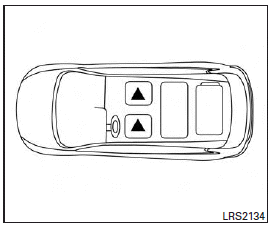
The illustration shows the seating positions equipped with head restraints. The first row head restraints are adjustable.
Indicates the seating position is equipped with a head restraint.
Components
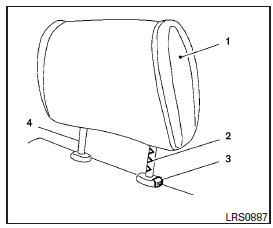
1. Head restraint
2. Adjustment notches
3. Lock knob
4. Stalks
Adjustment
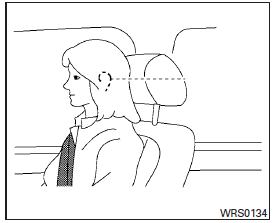
Adjust the head restraint so the center is level with the center of the seat occupant’s ears.
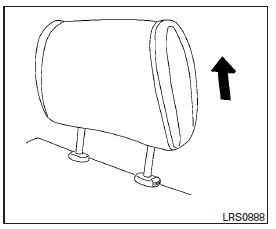
To raise the head restraint, pull it up.
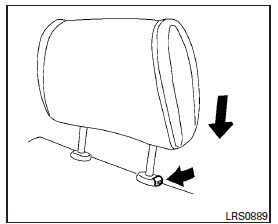
To lower, push and hold the lock knob and push the head restraint down.
Removal (head restraints without Dual head restraint DVD system only)
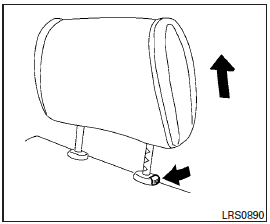
Use the following procedure to remove the adjustable head restraints.
1. Pull the head restraint up to the highest position.
2. Push and hold the lock knob.
3. Remove the head restraint from the seat.
4. Store the head restraint properly so it is not loose in the vehicle.
5. Reinstall and properly adjust the head restraint before an occupant uses the seating position.
Install
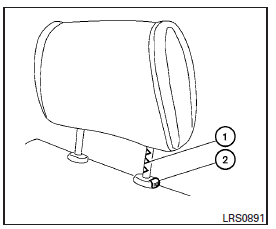
1. Align the head restraint stalks with the holes in the seat. Make sure the head restraint is facing the correct direction. The stalk with the adjustment notches 1 must be installed in the hole with the lock knob 2 .
2. Push and hold the lock knob and push the head restraint down.
3. Properly adjust the head restraint before an occupant uses the seating position.
See also:
2010 Infiniti G37 Review
If you're shopping $40,000 sport sedans, the Infiniti G37 is required driving: It is smartly appointed, well-equipped, reliable and as much of a hoot to drive as the BMW 3 Series.
The BMW pedestal ...
Cleaning interior
Occasionally remove loose dust from the
interior trim, plastic parts and seats using
a vacuum cleaner or soft bristled brush.
Wipe the vinyl and leather surfaces with a
clean, soft cloth dampe ...
Towing safety
Trailer hitch
Your vehicle may be equipped with an optional trailer tow package. The trailer tow package includes a receiver-type frame mounted hitch. This hitch is rated for the maximum towing capac ...