
Using the panic alarm
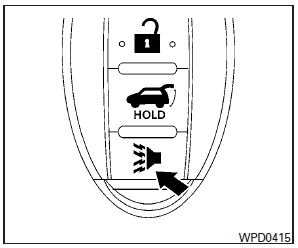
If you are near your vehicle and feel threatened, you may activate the panic alarm to call attention by pressing and holding the  button
on the Intelligent Key for longer than 0.5 seconds.
button
on the Intelligent Key for longer than 0.5 seconds.
The panic alarm and headlights will stay on for a period of time.
The panic alarm stops when:
● It has run for a period of time, or
● Any button is pressed on the Intelligent Key.
● The request switch on the driver or passenger door has been pushed and the Intelligent Key is in range of the door handle.
See also:
Vehicle recovery (freeing a stuck vehicle)
WARNING
► Stand clear of a stuck vehicle.
► Do not spin your tires at high speed. This
could cause them to explode and result
in serious injury. Parts of your vehicle
could also ...
Tire dressing
INFINITI does not recommend the use of
tire dressings. Tire manufacturers apply a
coating to the tires to help reduce discoloration
of the rubber. If a tire dressing is
applied to the tires, i ...
Forward-facing child restraint installation using the seat belts
WARNING
► The three-point seat belt with Automatic
Locking Retractor (ALR) must be used
when installing a child restraint. Failure
to use the ALR mode will result in the
child restrai ...