
Lane camera unit maintenance

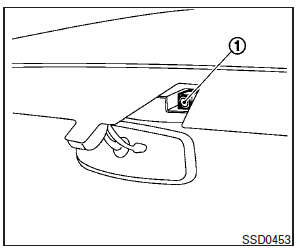
The lane camera unit 1 for the LDW/LDP system is located above the inside mirror. To keep the proper operation of the LDW/ LDP systems and prevent a system malfunction, be sure to observe the following:
● Always keep the windshield clean.
● Do not attach a sticker (including transparent material) or install an accessory near the camera unit.
● Do not place reflective materials, such as white paper or a mirror, on the instrument panel. The reflection of sunlight may adversely affect the camera unit’s capability of detecting the lane markers.
● Do not strike or damage the areas around the camera unit. Do not touch the camera lens or remove the screw located on the camera unit. If the camera unit is damaged due to an accident, contact an INFINITI retailer.
See also:
Servicing air conditioner
1. OFF button
2. Fan speed increase (+) button
3. AUTO button
4. Temperature increase ( )
button
5. Temperature decrease ( )
button
6. Display
7. Fan speed decrease (-) button ...
Horn
To sound the horn, push near the horn icon of the steering wheel.
WARNING
Do not disassemble the horn. Doing so could affect proper operation of the supplemental front air bag system. Tampering ...
Rain-sensing auto wiper system (if so equipped)
The rain-sensing auto wiper system can automatically turn on the wipers and adjust the wiper speed depending on the rainfall and the vehicle speed by using the rain sensor located on the upper part ...