
Windshield wiper and washer switch

 WARNING
In freezing temperatures the washer solution
may freeze on the window and obscure
your vision which may lead to an accident.
Warm the window with the defroster before
you wash the window.
 CAUTION
► Do not operate the washer continuously
for more than 30 seconds.
► Do not operate the washer if the
reservoir tank is empty.
► Do not fill the window washer reservoir
tank with washer fluid concentrates at
full strength. Some methyl alcohol
based washer fluid concentrates may
permanently stain the grille if spilled
while filling the window washer reservoir
tank.
► Pre-mix washer fluid concentrates with
water to the manufacturer’s recommended
levels before pouring the fluid
into the window washer reservoir tank.
Do not use the window washer reservoir
tank to mix the washer fluid concentrate
and water.
If the windshield wiper operation is interrupted by snow or ice, the wiper may stop moving to protect its motor. If this occurs, turn the wiper switch to the OFF position and remove the snow or ice that is on and around the wiper arms. In approximately 1 minute, turn the switch on again to operate the wiper.
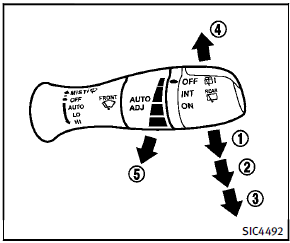
The windshield wiper and washer operates
when the ignition switch is in the ON
position.
Push the lever down to operate the wiper
at the following speed:
1 AUTO — operates the rain-sensing
auto wiper system. (See “Rain-sensing
auto wiper system” later in this
section.)
2 LO — continuous low speed operation
3 HI — continuous high speed operation
4 MIST — one sweep operation of the
wiper
See also:
Brake pad wear warning
The disc brake pads have audible wear warnings. When a brake pad requires replacement, it will make a high pitched scraping sound when the vehicle is in motion. This scraping sound will first occur on ...
Tire and loading information label
The cold tire pressure is shown on the Tire and Loading Information label. The label is located as shown. ...
How to use the STATUS button
The STATUS button is used to display system information. Three different split screens of information are available. Press the STATUS button multiple times to cycle through these screens as follows:
...