
Operating manual lift gate
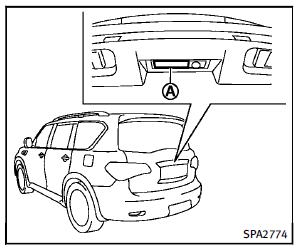
To open the lift gate, unlock it and push the
lift gate opener switch A . Pull up the lift
gate to open.
The lift gate can be unlocked by:
► pushing the unlock button on the
Intelligent Key twice.
► pushing the lift gate request switch with
the Intelligent Key carried on you.
► pushing the door handle request switch
twice with the Intelligent Key carried on
you.
► pushing the power door lock switch to
the unlock position.
► inserting the mechanical key into the
driver’s door key cylinder and turning it
to the rear of the vehicle twice.
To close the lift gate, pull down until it
securely locks.
See also:
Automatic climate control
WARNING
► The air conditioner cooling function
operates only when the engine is running.
► Do not leave children or adults who
would normally require the support of
others alone ...
Switch Beeps settings (models without navigation
system)
Switch Beeps settings (models without navigation
system)
The “Switch Beeps” screen will appear when pushing the SETTING button, selecting the “Switch Beeps” key with the INFINITI controller and p ...
INFINITI Vehicle Immobilizer System
The INFINITI Vehicle Immobilizer System will not allow the engine to start without the use of the registered Intelligent Key.
Never leave these keys in the vehicle.
Statement related to section 15 o ...