
Sun visors

 CAUTION
► Do not store the main sun visor before
storing the extension sun visor.
► Do not pull the extension sun visor
forcedly downward.
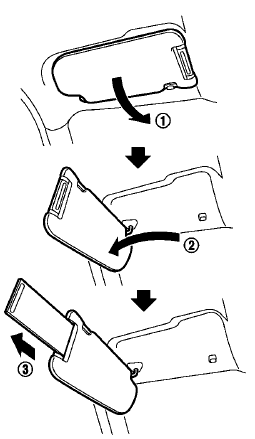
1. To block out glare from the front, swing down the main sun visor 1 . 2. To block glare from the side, remove the main sun visor from the center mount and swing it to the side 2 . 3. Draw out the extension sun visor 3 from the main sun visor to block from further glare.
See also:
Interior light control switch
Interior light control switch
The interior light control switch has three positions: ON, DOOR and OFF.
ON position
When the switch is in the ON position 1 the map lights and rear personal lights ...
Emergency engine shut off
To shut off the engine in an emergency situation while driving, perform the following procedure: . Rapidly push the push-button ignition switch 3 consecutive times in less than 1.5 seconds, or . Push ...
How to change the set vehicle speed
To cancel the preset speed, use any of these methods:
● Push the CANCEL switch. The set vehicle speed indicator will go out.
● Tap the brake pedal. The set vehicle speed indicator wi ...