
Booster seat installation
CAUTION
Do not use the lap/shoulder belt Automatic Locking Retractor (ALR) mode when using a booster seat with the seat belts.
Refer to all Warnings and Cautions in the “Child safety”, “Child restraints” and “Booster seats” sections earlier in this section before installing a child restraint.
Follow these steps to install a booster seat in the rear seat or in the front passenger seat:
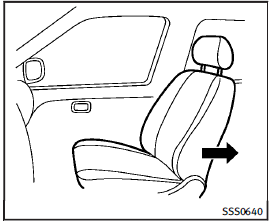
1. If you must install a booster seat in the front seat, move the seat to the rearmost position. 2. Position the booster seat on the seat.
Only place it in a forward-facing direction.
Always follow the booster seat manufacturer’s instructions.
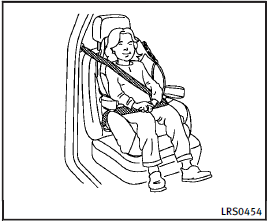
Front passenger position
3. The booster seat should be positioned on the vehicle seat so that it is stable.
If necessary, adjust or remove the head restraint to obtain the correct booster seat fit. If the head restraint is removed, store it in a secure place. Be sure to reinstall the head restraint when the booster seat is removed.
See “Head restraints” for head restraint, removal and installation information.
If the seating position does not have an adjustable head restraint and it is interfering with the proper booster seat fit, try another seating position or a different booster seat.
4. Position the lap portion of the seat belt low and snug on the child’s hips. Be sure to follow the booster seat manufacturer’s instructions for adjusting the seat belt routing.
5. Pull the shoulder belt portion of the seat belt toward the retractor to take up extra slack. Be sure the shoulder belt is positioned across the top, middle portion of the child’s shoulder. Be sure to follow the booster seat manufacturer’s instructions for adjusting the seat belt routing.
6. Follow the warnings, cautions and instructions for properly fastening a seat belt shown in “Seat belts”.
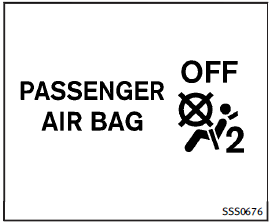
7. If the booster seat is installed in the front passenger seat, push the ignition switch to the ON position. The front passenger air bag status light
 may or may not illuminate depending on the size of the child and the type of booster seat used. See “Front passenger air bag and status light”.
See also:
Anti-lock Braking System (ABS)
WARNING
► The Anti-lock Braking System (ABS) is a
sophisticated device, but it cannot prevent
accidents resulting from careless or
dangerous driving techniques. It can
help maintain v ...
Repair and replacement procedure
The front air bags, side air bags, curtain and rollover air bags and pretensioners are designed to inflate on a one-time-only basis. As a reminder, unless it is damaged, the supplemental air bag warni ...
Using panic alarm
If you are near your vehicle and feel threatened, you may activate the alarm to call attention as follows: 1. Push the PANIC
button 4 on the key for more than 1 second.
2. The theft warning alarm ...