
Intelligent Key
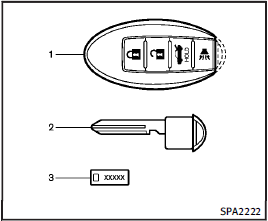
Intelligent Key
1. Intelligent Keys (2 sets)
2. Mechanical keys (inside the Keys) (2 sets)
3. Key number plate (1 set)
Your vehicle can only be driven with the Intelligent Keys which are registered to your vehicle’s Intelligent Key system components and INFINITI Vehicle Immobilizer System components. As many as 4 Intelligent Keys can be registered and used with one vehicle. The new keys must be registered by an INFINITI retailer prior to use with the Intelligent Key system and INFINITI Vehicle Immobilizer System of your vehicle. Since the registration process requires erasing all memory in the Intelligent Key components when registering new keys, be sure to take all Intelligent Keys that you have to the INFINITI retailer.
It is possible that the Intelligent Key functions become canceled. Contact an INFINITI retailer.
CAUTION
• Be sure to carry the Intelligent Key with you when driving. The Intelligent Key is a precision device with a built-in transmitter.
To avoid damaging it, please note the following.
— The Intelligent Key is water resistant; however, wetting may damage the Intelligent Key. If the Intelligent Key gets wet, immediately wipe until it is completely dry.
— Do not bend, drop or strike it against another object.
— If the outside temperature is below 148F (−108C) degrees, the battery of the Intelligent Key may not function properly.
— Do not place the Intelligent Key for an extended period in a place where temperatures exceed 1408F (608C).
— Do not change or modify the Intelligent Key.
— Do not use a magnet key holder.
— Do not place the Intelligent Key near an electric appliance such as a television set or personal computer.
— Do not allow the Intelligent Key to come into contact with water or salt water, and do not wash it in a washing machine. This could affect the system function.
• If an Intelligent Key is lost or stolen, INFINITI recommends erasing the ID code of that Intelligent Key. This will prevent the Intelligent Key from unauthorized use to unlock the vehicle. For information regarding the erasing procedure, please contact an INFINITI retailer.
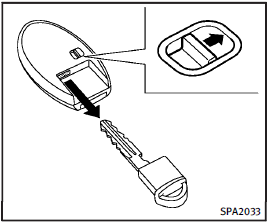
Mechanical key
To remove the mechanical key, release the lock knob at the back of the Intelligent Key.
To install the mechanical key, firmly insert it into the Intelligent Key until the lock knob returns to the lock position.
Use the mechanical key to lock or unlock the doors, glove box and trunk passthrough lid, if they are equipped with a key cylinder.
See “Doors” and “Trunk lid”, “Storage” and “Seats”.
CAUTION
Always carry the mechanical key installed in the key.
See also:
Cup holders
CAUTION
► Avoid abrupt starting and braking when
the cup holder is being used to prevent
spilling the drink. If the liquid is hot, it
can scald you or your passenger.
► Use onl ...
Booster seats
Precautions on booster seats
WARNING
If a booster seat and seat belt are not used
properly, the risk of a child being injured in
a sudden stop or collision greatly increases:
► Make su ...
Lane departure warning (LDW) system
Precautions on LDW system
WARNING
● This system is only a warning device to inform the driver of a potential unintended lane departure. It will not steer the vehicle or prevent loss of contr ...