
How to change the set distance to the vehicle ahead

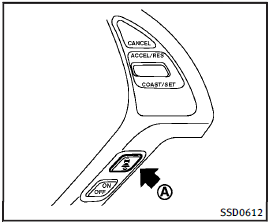
How to change the set distance to the vehicle ahead
The distance to the vehicle ahead can be selected at any time depending on the traffic conditions.
Each time the DISTANCE switch A is pushed, the set distance will change to long, middle, short and back to long again in that sequence.
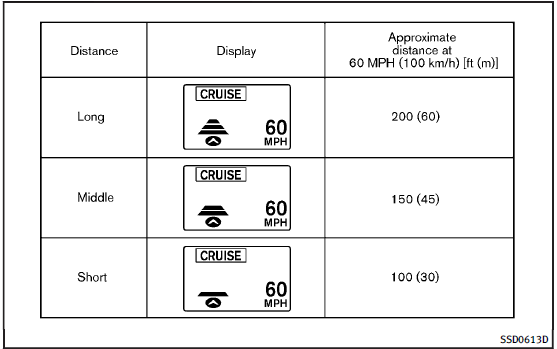
• The distance to the vehicle ahead will change according to the vehicle speed.
The higher the vehicle speed, the longer the distance.
• If the engine is stopped, the set distance becomes “long”. (Each time the engine is started, the initial setting becomes “long”.)
See also:
Locking doors
1. Place the ignition switch in the LOCK position.
2. Close all doors.
3. Press the button on the
Intelligent Key.
4. The hazard warning lights flash twice and the horn beeps once.
5. ...
Dimensions
...
Replacing wheels and tires
When replacing a tire, use the same size, tread design, speed rating and load carrying capacity as originally equipped. (See “Specifications” for recommended types and sizes of tires and wheels.)
WAR ...