
Intelligent Key battery replacement
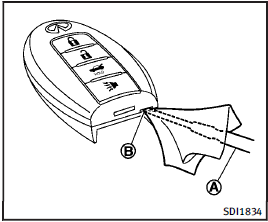
Replace the battery as follows: 1. Release the lock knob at the back of the Intelligent Key and remove the mechanical key.
2. Insert a flat-blade screwdriver A wrapped with a cloth into the slit B of the corner and twist it to separate the upper part from the lower part.
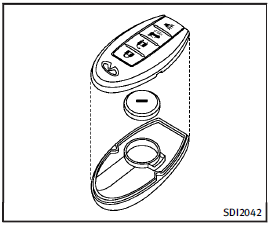
3. Replace the battery with a new one.
Recommended battery: CR2032 or equivalent.
• Do not touch the internal circuit and electric terminals as it could cause a malfunction.
• Hold the battery by the edges.
Holding the battery across the contact points will seriously deplete the storage capacity.
• Make sure that the + side faces the bottom of the case.
4. Align the tips of the upper and lower parts, and then push them together until it is securely closed.
5. Push the buttons two or three times to check its operation.
See an INFINITI retailer if you need any assistance for replacement.
FCC Notice:
For USA:
This device complies with Part 15 of the FCC Rules. Operation is subject to the following two conditions: (1) This device may not cause harmful interference, and (2) this device must accept any interference received, including interference that may cause undesired operation.
NOTE:
Changes or modifications not expressly approved by the party responsible for compliance could void the user’s authority to operate the equipment.
For Canada:
This device complies with RSS-210 of Industry Canada. Operation is subject to the following two conditions: (1) this device may not cause interference, and (2) this device must accept any interference, including interference that may cause undesired operation of the device.
See also:
Increasing fuel economy
► Accelerate slowly and smoothly. Maintain
cruising speeds with a constant
accelerator position.
► Drive at moderate speeds on the highway.
► Avoid unnecessary stopping and b ...
Glass
Use glass cleaner to remove smoke and dust film from the glass surfaces. It is normal for glass to become coated with a film after the vehicle is parked in the hot sun. Glass cleaner and a soft cloth ...
Interior
Nothing inside the QX gives the impression that underneath lies a trucklike
chassis capable of towing 8,500 pounds. Rich materials fill the cabin, which is
laid out with classiness befitting an In ...