
Console box

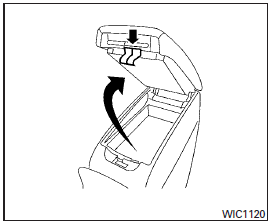
Upper half
Pull up on the driver’s side latch to open the upper half of the console box.
The upper half of the console box may be used for storage of cellular phones. An access hole is provided at the front of the upper half of the console box for a phone or iPod cord routing to the power outlet.
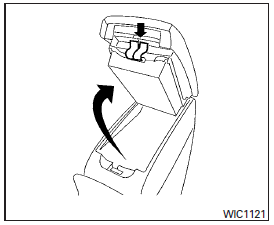
Lower half
Pull up on the lever to open the lower half of the console box. A power outlet is located inside the console box and there is storage for compact discs.
See also:
Automatic anti-glare type
The inside mirror is designed so that it automatically changes reflection according to the intensity of the headlights of the following vehicle.
The anti-glare system will be automatically turned on ...
Seats, seat belts and Supplemental Restraint System (SRS)
1. Seat belt for 3rd row center seat belt
(Page 1-27)
2. Roof-mounted curtain side-impact
and rollover supplemental air bags
(P.1-54)
3. Head Restraints (P.1-10)
— Front-seat Active Head ...
Rain-sensing auto wiper system
The rain-sensing auto wiper system can
automatically turn on the wipers and
adjust the wiper speed depending on the
rainfall and the vehicle speed by using the
rain sensor located on the upp ...