
Programming HomeLink

If you have any questions or are having difficulty programming your HomeLink buttons, refer to the HomeLink web site at: www.homelink.com or call 1-800-355-3515.
NOTE:
Place the ignition switch in the ACC position when programming HomeLink . It is also recommended that a new battery be placed in the hand-held transmitter of the device being programmed to HomeLink for quicker programming and accurate transmission of the radio-frequency.
1. Position the end of your hand-held transmitter 1–3 inches (5–14 cm) away from the HomeLink surface, keeping the HomeLink indicator light in view.
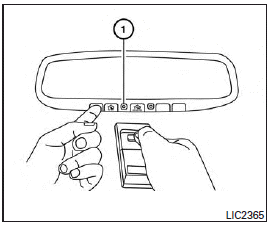
2. Using both hands, simultaneously press and hold the desired HomeLink button and handheld transmitter button. DO NOT release until the HomeLink indicator light flashes 1 slowly and then rapidly. When the indicator light flashes rapidly, both buttons may be released. (The rapid flashing indicates successful training.)
NOTE:
Some devices may require you to replace Step 2 with the cycling procedure noted in the “Programing HomeLink for Canadian customers and gate openers” section.
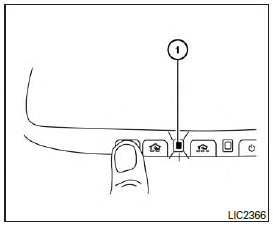
3. Press and hold the trained HomeLink button and observe the indicator light.
● If the indicator light 1 is solid/ continuous, training is complete and your device should activate when the HomeLink button is pressed and released.
● If the indicator light 1 blinks rapidly for two seconds and then turns to a solid/continuous light, continue with Steps 4-6 for a rolling code device.
A second person may make the following steps easier. Please use a ladder or other device. Do not stand on your vehicle to perform the next steps.
4. At the receiver (motorhead unit) in the garage, locate the “learn” or “smart” button (usually near where the hanging antenna wire is attached to the unit). If there is difficulty locating the button, reference the garage door opener’s manual.
5. Press and release the “learn” or “smart” button (the name and color of the button may vary by manufacturer.) NOTE: Once the button is pressed, you have approximately 30 seconds to initiate the next step.
6. Return to the vehicle and firmly press and hold the trained HomeLink button for two seconds and release. Repeat the “press/hold/release” sequence up to 3 times to complete the training process.
HomeLink should now activate your rolling code equipped device.
7. If you have any questions or are having difficulty programming your HomeLink buttons, refer to the HomeLink web site at:
www.homelink.com or call 1-800-355-3515.
See also:
Wheel balance
Unbalanced wheels may affect vehicle handling and tire life. Even with regular use, wheels can get out of balance. Therefore, they should be balanced as required.
Wheel balance service should be perf ...
Opening trunk lid
1. Push the TRUNK button 3 on
the Intelligent Key for more than 1 second.
2. The trunk will unlatch.
3. Raise the trunk lid to open the trunk. ...
Wheels
Wash the wheels when washing the vehicle to maintain their appearance.
• Clean the inner side of the wheels when the wheel is changed or the underside of the vehicle is washed.
• Inspect wheel rims ...