
How to park with predicted course lines

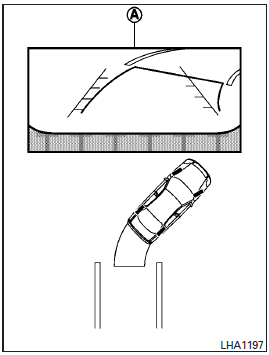
1. Visually check that the parking space is safe before parking your vehicle.
2. The rear view of the vehicle is displayed on the screen A when the shift selector is moved to the R (Reverse) position.
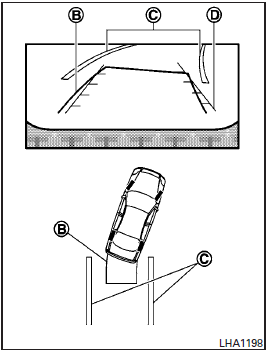
3. Slowly back up the vehicle adjusting the steering wheel so that the predicted course lines B enter the parking space C .
4. When the back of the vehicle enter the parking space C , maneuver the steering wheel to make the vehicle width guide lines D parallel to the parking spaces C .
5. When the vehicle is parked in the space completely, move the shift selector to the P (Park) position and apply the parking brake.
See also:
4WD shift switch
► Shift the 4WD shift switch to either the
AUTO, 4H or 4L position, depending on
driving conditions.
► With the switch set to the AUTO position,
distribution of torque to the front ...
Warning/indicator lights and audible reminders
Warning/indicator lights and audible reminders ...
Repair and replacement procedure
The front air bags, side air bags, curtain and rollover air bags and pretensioners are designed to inflate on a one-time-only basis. As a reminder, unless it is damaged, the supplemental air bag warni ...