
Vents

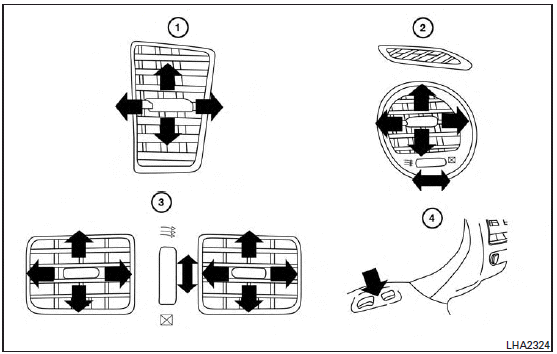
Adjust air flow direction for the driver’s and passenger’s side vents 1 , center vents 2 , and rear vents 3 by moving the vent slide and/or vent assemblies.
Open or close the  vents using the
dial. Move the dial toward the to open the vents or toward the
vents using the
dial. Move the dial toward the to open the vents or toward the  to close them.
The vents underneath the second row seats 4 are operational when the  air flow
mode is selected. These vents cannot be closed. See “Air flow control” in this section for more information.
air flow
mode is selected. These vents cannot be closed. See “Air flow control” in this section for more information.
See also:
Sedan
Exterior rear
1. High-mounted stop light (Bulb replacement)2. Rear window defroster3. Rear combination light (Bulb replacement)4. Satellite antenna5. Fuel-filler door— Operation— Fuel recommendatio ...
How to use the INFINITI controller
Choose an item on the display by rotating or pushing the center dial 2 upward or downward.
Press the ENTER button 1 to select an item.
If you press either of the BACK
buttons 3 before the o ...
Warning systems switch (if so equipped)
The warning systems switch is used to turn
on and off the warning systems (Forward
Collision Warning (FCW), Lane Departure
Warning (LDW) and Blind Spot Warning
(BSW) systems) that are activa ...