
Intelligent cruise control system display and indicators

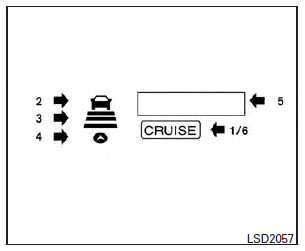
The display is located between the speedometer and tachometer.
1. CRUISE ON/OFF switch indicator:
Indicates that the CRUISE ON/OFF switch is ON.
2. Vehicle ahead detection indicator:
Indicates whether it detects a vehicle in front of you
3. Set distance indicator:
Displays the selected distance between vehicles set with the distance switch.
4. Indicates your vehicle
5. Set vehicle speed indicator:
Indicates the set vehicle speed.
For Canadian models, the speed is displayed in km/h.
6. Intelligent Cruise Control system warning light (orange):
The light comes on if there is a malfunction in the ICC system.
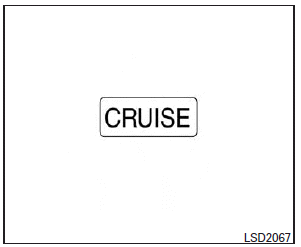
When the ignition switch is placed in the ON position, the indicators come on as illustrated to check for a burned-out bulb, and it turns off when the engine is started.
See also:
Regulatory Information
FCC Regulatory information
– CAUTION
: To maintain compliance with FCC’s RF exposure guidelines, use only the supplied antenna. Unauthorized antenna, modification, or attachments could damage the t ...
Self-adjusting brakes
Your vehicle is equipped with self-adjusting brakes.
The disc-type brakes self-adjust every time the brake pedal is applied.
WARNING
See an INFINITI retailer for a brake system check if the brake p ...
Voltmeter
When the ignition switch is pushed to the
ON position, the volt meter indicates the
battery voltage. When the engine is running,
it indicates the generator voltage.
While cranking the engine ...