
Jacking up vehicle and removing thedamaged tire

WARNING
● Never get under the vehicle while it is supported only by the jack. If it is necessary to work under the vehicle, support it with safety stands.
● Use only the jack provided with your vehicle to lift the vehicle. Do not use the jack provided with your vehicle on other vehicles. The jack is designed for lifting only your vehicle during a tire change.
● Use the correct jack-up points. Never use any other part of the vehicle for jack support.
● Never jack up the vehicle more than necessary.
● Never use blocks on or under the jack.
● Do not start or run the engine while vehicle is on the jack. It may cause the vehicle to move. This is especially true for vehicles with limited slip differentials.
● Do not allow passengers to stay in the vehicle while it is on the jack.
● Never run the engine with a wheel(s) off the ground. It may cause the vehicle to move.
Always refer to the illustration for the correct placement and jack-up points for your specific vehicle model and jack type.
Carefully read the caution label attached to the jack body and the following instructions.
1. Loosen each wheel nut one or two turns by turning counterclockwise with the wheel nut wrench. Do not remove the wheel nuts until the tire is off the ground.
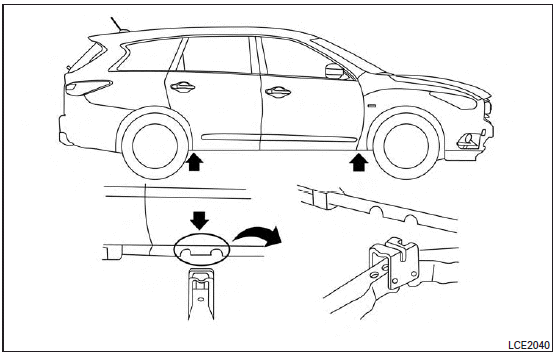
2. Place the jack directly under the jack-up point as illustrated so the top of the jack contacts the vehicle at the jack-up point. The jack-up points are indicated by stamped arrows on the side of the frame.
The jack should be used on firm and level ground.
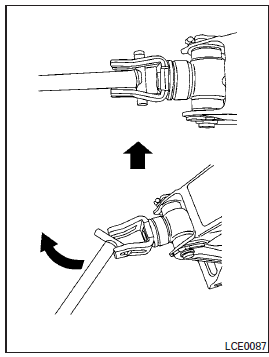
3. Install the assembled jack rod into the jack as shown.
4. To lift the vehicle, securely hold the jack lever and rod. Carefully raise the vehicle until the tire clears the ground.
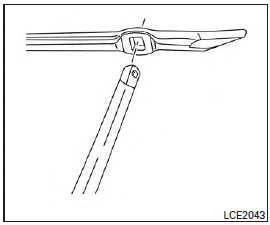
NOTE:
If the lug nut wrench/jack handle contacts the ground while raising the vehicle, disassemble the lug nut wrench from the jack extension rod, rotate it 90 degrees and reassemble.
5. Remove the wheel nuts and then remove the tire.
See also:
Scheduled maintenance
For your convenience, both required and optional scheduled maintenance items are described and listed in your “INFINITI Service and Maintenance Guide”. You must refer to that guide to ensure that nece ...
Air conditioning system refrigerant and lubricant recommendations
The air conditioning system in your INFINITI vehicle must be charged with the refrigerant HFC-134a (R-134a) and the lubricant, NISSAN A/C system oil Type S or the exact equivalents.
CAUTION
The use ...