
Instrument panel
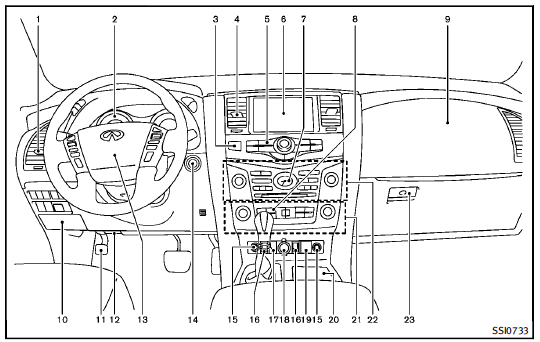
1. Side ventilator
2. Meters and gauges
3. Hazard indicator flasher switch
4. Center ventilator
5. Center multi-function control panel
— Vehicle information and setting
buttons
6. Center display
— Around View Monitor
— Navigation system
— DVD player operation
7. Clock
8. Defroster switch/Deicer switch
9. Front passenger supplemental air bag
10. Fuse box
11. Parking brake
12. Hood release handle
13. Steering wheel
— Horn
— Driver supplemental air bag
— Power steering system
14. Push-button ignition switch
15. Climate controlled seat switch/ Heated seat switch
16. Remote tip-up 2nd row seat switch
17. Heated steering wheel switch
18. Power outlet
19. Front passenger air bag status light
20. Cup holder
21. Automatic air conditioning system
22. Audio system
23. Glove box
: if so equipped
: Refer to the separate Navigation
System Owner’s Manual.
See also:
Precautions on booster seats
WARNING
If a booster seat and seat belt are not used properly, the risk of a child being injured in a sudden stop or collision greatly increases:• Make sure the shoulder portion of the belt is away f ...
Locking with power door lock switch
To lock all the doors without a key, push the door lock switch (driver’s or front passenger’s side) to the lock position 1 . When locking the door this way, be certain not to leave the key inside th ...
Foldable outside mirrors
Fold the outside mirror by pushing it toward the rear of the vehicle. ...