
Instrument brightness control

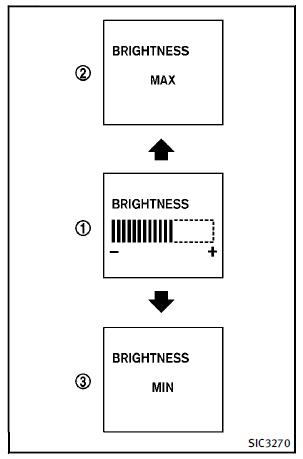
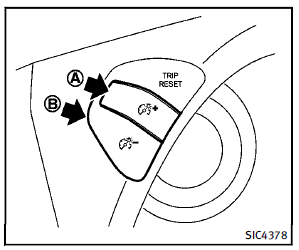
The instrument brightness control switch can be operated when the ignition switch is in the ON position. When the switch is operated, the dot matrix liquid crystal display switches to the brightness adjustment mode. Push the upper switch A to brighten the instrument panel lights. The bar1 moves to the + side. When reaching the maximum brightness, “MAX” appears on the display 2 .Push the lower switch B to dim the instrument panel lights. The bar1 moves to the − side. When reaching the minimum brightness, “MIN” appears on the display
3 . However, “MIN” does not appear during the nighttime. The dot matrix liquid crystal display returns to the normal display under the following conditions:
► when the instrument brightness control
switch is not operated for more than 5
seconds.
► when the  switch on the right
side of the combination meter panel is
pushed.
switch on the right
side of the combination meter panel is
pushed.
See also:
Interior Tradeoffs
Once I'd called into question the FX's sportiness, I found it harder to
justify its drawbacks. Always a bold design statement, the FX's sleek shape
takes a toll on interior space. Thankfully, the ...
Opening windows
The UNLOCK button operation also allows you to open the window that is equipped with the automatic open/close function. (See “Power windows”).
To open the window, push the door UNLOCK button
2 on ...
Center multi-function control panel
Models with navigation system
1. “STATUS” status display button2, 6, 7, 10, 11. For navigation system control buttons (Refer to the separate
Navigation System Owner’s Manual.)3. INFINITI controll ...