
Vehicle identification number (chassis number)

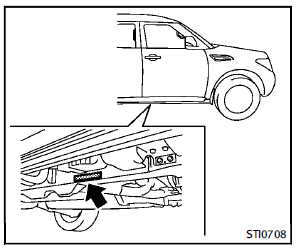
The number is stamped as shown.
See also:
Playing a DVD
DISC·AUX button:
Park the vehicle in a safe location for the front seat occupants to operate the DVD drive while watching the images.
Push the DISC·AUX button on the instrument panel and turn the di ...
Vehicle Dynamic Control (VDC) system
The Vehicle Dynamic Control (VDC) system uses various sensors to monitor driver inputs and vehicle motion. Under certain driving conditions, the VDC system helps to perform the following functions.
• ...
Towing a trailer
Your vehicle was designed to be used to carry passengers and cargo. INFINITI does not recommend trailer towing, because it places additional loads on your vehicle’s engine, drivetrain, steering, braki ...