
Vehicle Dynamic Control (VDC) OFF switch
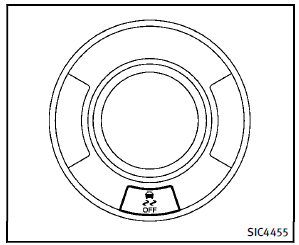
The vehicle should be driven with the Vehicle Dynamic Control (VDC) system on for most driving conditions. If the vehicle is stuck in mud or snow, the VDC system reduces the engine output to reduce wheel spin. The engine speed will be reduced even if the accelerator is depressed to the floor. If maximum engine power is needed to free a stuck vehicle, turn the VDC system off. To turn off the VDC system, push the VDC OFF switch. The indicator will illuminate. Push the VDC OFF switch again or restart the engine to turn on the system. (See “Vehicle Dynamic Control (VDC) system” in the “5. Starting and driving” section.)
See also:
Seat belt maintenance
• To clean the seat belt webbing, apply a mild soap solution or any solution recommended for cleaning upholstery or carpets. Then, wipe with a cloth and allow the seat belts to dry in the shade.
Do n ...
Drinking alcohol/drugs and driving
WARNING
Never drive under the influence of alcohol or drugs. Alcohol in the bloodstream reduces coordination, delays reaction time and impairs judgement. Driving after drinking alcohol increases the ...
Head restraints (3rd row)
WARNING
Head restraints supplement the other vehicle safety systems. They may provide additional protection against injury in certain rear end collisions. Adjust the head restraints properly, as sp ...