
How to use touch screen

 CAUTION
► The glass screen on the liquid crystal
display may break if it is hit with a hard
or sharp object. If the glass screen
breaks, do not touch it. Doing so could
result in an injury.
► To clean the display, use a soft, dry
cloth. If additional cleaning is necessary,
use a small amount of neutral detergent
with a soft cloth. Never use a rough
cloth, alcohol, benzine, thinner or any
kind of solvent or paper towel with a
chemical cleaning agent. They will
scratch or deteriorate the panel.
► Do not splash any liquid such as water
or car fragrance on the display. Contact
with liquid will cause the system to
malfunction.
To ensure safe driving, some functions cannot be operated while driving. The on-screen functions that are not available while driving will be “grayed out” or muted. Park the vehicle in a safe location and then operate the navigation system.
 WARNING
► ALWAYS give your full attention to
driving.
► Avoid using vehicle features that could
distract you. If distracted, you could lose
control of your vehicle and cause an
accident.
Example
Touch screen operation
With this system, the same operations as those for the INFINITI controller are possible using the touch screen operation.
Selecting the item:
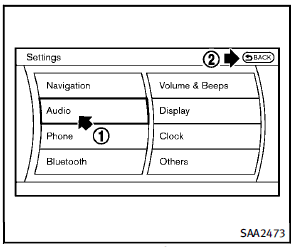
Touch an item to select it. To select the “Audio” settings, touch the “Audio” area 1 on the screen. Touch the BACK2 button to return to the previous screen.
Example
Adjusting an item:
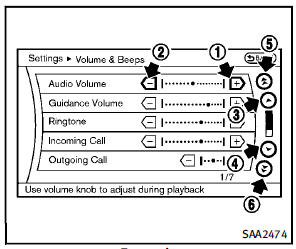
Touch the + 1 or − 2 button to adjust the settings. Touch the 3 or 4 button to move to the previous or next item. Touch the 5 or 6 button to move to the previous or next page.
Inputting characters:
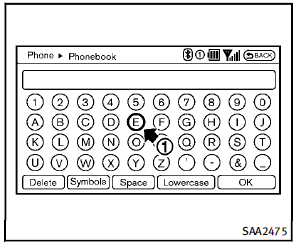
Touch the letter or number 1 . There are some options available when inputting characters.
► Uppercase:
Shows uppercase characters.
► Lowercase:
Shows lowercase characters.
► Symbols:
Shows symbols such as the question
mark (?).
► Space:
Inserts a space.
► Delete:
Deletes the last character that has been
input with one touch. Push and hold
the button to delete all of the characters.
► OK:
Completes character inputs.
Touch screen maintenance
If you clean the display screen, use a dry, soft cloth. If additional cleaning is necessary, use a small amount of neutral detergent with a soft cloth. Never spray the screen with water or detergent. Dampen the cloth first, and then wipe the screen.
See also:
Headlight switch
Lighting
1 Turn the switch to the
position:
The front parking, side marker, tail,
license plate and instrument lights
will come on.
2 Turn the switch to the position:
Headlights wil ...
Front
To open the ashtray lid, push the lid down and release it 1 .
To empty the ashtray, pull out 2 .
The cigarette lighter operates when the ignition switch is in the ON position.
Push the lighter in a ...
Storage tray
WARNING
Do not place sharp objects in the trays to help prevent injury in an accident or sudden stop. ...