
Turn signal switch

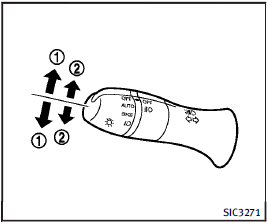
Turn signal switch
1 Turn signal
Move the lever up or down to signal the turning direction. When the turn is completed, the turn signals cancel automatically.
2 Lane change signal
To indicate a lane change, move the lever up or down to the point where lights begin flashing.
See also:
Windows
Power windows
WARNING
● Make sure that all passengers have their hands, etc. inside the vehicle while it is in motion and before closing the windows. Use the window lock switch to prevent un ...
Radio
Push the ignition switch to the ACC or ON position and push the radio band select button to turn on the radio. If you listen to the radio with the engine not running, the ignition switch should be pus ...
Bluetooth® Audio player (models with navigation system)
• Some Bluetooth® audio devices may not be recognized by the in-vehicle audio system.
• It is necessary to set up the wireless connection between a compatible Bluetooth ® audio device and the in-vehi ...