
Map lights

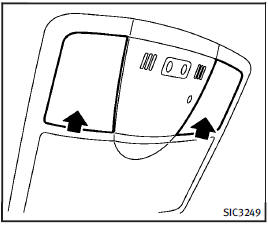
Map lights
Push the button as illustrated to turn the light on or off.
See also:
INFINITI Intelligent Key
Your vehicle can only be driven with the Intelligent Keys which are registered to your vehicle’s Intelligent Key system components and INFINITI Vehicle Immobilizer System components. As many as 4 Inte ...
Exterior styling
A long bonnet, short overhangs and dramatically raked roof line give the
Infiniti G37 Coupé a silhouette that sets it apart from rival products based
more heavily on their saloon counterpar ...
Break-in schedule
CAUTION
During the first 1,200 miles (2,000 km), follow these recommendations to obtain maximum engine performance and ensure the future reliability and economy of your new vehicle. Failure to foll ...