
Switch Beeps settings (models without navigation system)

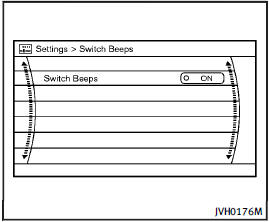
Switch Beeps settings (models without navigation
system)
The “Switch Beeps” screen will appear when pushing the SETTING button, selecting the “Switch Beeps” key with the INFINITI controller and pushing the ENTER button.
Switch Beeps:
When this item is turned to ON, you will hear a beep sound when you use a button.
See also:
Sensor maintenance
The sensor for the ICC system A is located below the front bumper.
To keep the ICC system operating properly, be sure to observe the following:
● Always keep the sensor clean. Wipe with ...
Operating power lift gate
To operate the power lift gate, the selector
lever must be in the P (Park) position.
The power lift gate will not operate if the
battery voltage is low.
Power lift gate main switch
The power ...
Intelligent Key battery replacement
CAUTION
Be careful not to allow children to swallow
the battery and removed parts.
Replace the battery as follows:
1. Release the lock knob at the back of the
Intelligent Key and remove t ...