
Exterior
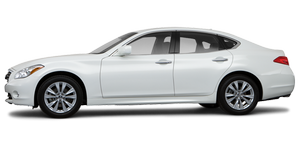
The M35x has fab curb appeal. Its look straddles the line between luxury and sport sedan, and it works. The tires are big, the body is sleek and it isn't too large.
After the trouble I had installing my child-safety seats and my children into the M35x, I noticed that something was off - in a good way. It was a little too easy to get the kids into their child-safety seats. Well, those clever Infiniti folks designed the rear doors to swing out to a full 80 degrees - wider than average. These doors are also sturdy without feeling like a ton of bricks. My son is the perfect height for car doors to knock him over, and many are so heavy that he's been dazed once or twice. I'm happy to report that he walked away from our week with the M35x unscathed.
Like many cars these days, the M35x has swivel headlights that illuminate turns, and keyless access with push-button start. The Intelligent All-Wheel Drive, however, is what really had me begging for more. This system monitors wheelspin, throttle position and speed to adapt the car to changing road conditions. The system also has a Snow Mode, which reduced aggravating wheelspin on ice and snow. Having Intelligent All-Wheel Drive on the M35x during a tempestuous Colorado snowstorm made a huge difference in my comfort level while driving.
Of course, living in Colorado means you never know what the weather is going to do next. The day after the snowstorm brought sun and 65 degrees, so I opened the M35x's expansive sunroof and enjoyed the day.
See also:
Troubleshooting guide
Verify the location of all Intelligent Keys that are programmed for the vehicle. If another Intelligent Key is in range or inside the vehicle, the vehicle system may respond differently than expected. ...
Radio
Place the ignition switch in the ACC or ON position and press the VOL (volume)/ON·OFF (power) knob to turn the radio on. If you listen to the radio with the engine not running, the ignition switch sho ...
Opening and closing windows with the mechanical key
The driver’s door key operation also allows you to open and close the window that is equipped with the automatic open/close function. (See “Power windows”).
To open the window, turn the driver’s door ...