
Intelligent Key battery replacement

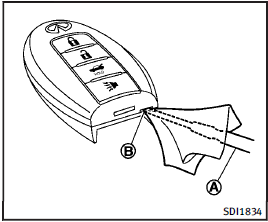
Replace the battery as follows: 1. Release the lock knob at the back of the Intelligent Key and remove the mechanical key.
2. Insert a flat-blade screwdriver A wrapped with a cloth into the slit B of the corner and twist it to separate the upper part from the lower part.
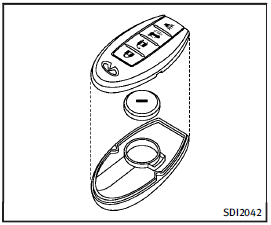
3. Replace the battery with a new one.
Recommended battery: CR2032 or equivalent.
• Do not touch the internal circuit and electric terminals as it could cause a malfunction.
• Hold the battery by the edges.
Holding the battery across the contact points will seriously deplete the storage capacity.
• Make sure that the + side faces the bottom of the case.
4. Align the tips of the upper and lower parts, and then push them together until it is securely closed.
5. Push the buttons two or three times to check its operation.
See an INFINITI retailer if you need any assistance for replacement.
FCC Notice:
For USA:
This device complies with Part 15 of the FCC Rules. Operation is subject to the following two conditions: (1) This device may not cause harmful interference, and (2) this device must accept any interference received, including interference that may cause undesired operation.
NOTE:
Changes or modifications not expressly approved by the party responsible for compliance could void the user’s authority to operate the equipment.
For Canada:
This device complies with RSS-210 of Industry Canada. Operation is subject to the following two conditions: (1) this device may not cause interference, and (2) this device must accept any interference, including interference that may cause undesired operation of the device.
See also:
Indicator lights
Automatic Transmission (AT) position indicator light (if so equipped)
When the ignition switch is pushed to the “ON” position, the indicator shows the automatic selector position.
In the manual sh ...
Measurement of weights
Secure loose items to prevent weight shifts that could affect the balance of your vehicle. When the vehicle is loaded, drive to a scale and weigh the front and the rear wheels separately to determine ...
The Inside
The G37 Limited's candy-red upholstery is a bit much for me, but cabin
quality is otherwise very good. Padded surfaces run all the way down to foot
level, with soft-touch areas in all the places y ...