
Vehicle load capacity
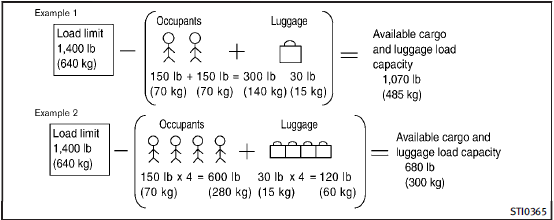
Do not exceed the load limit of your vehicle shown as “The combined weight of occupants and cargo” on the Tire and Loading Information label. Do not exceed the number of occupants shown as “Seating Capacity” on the Tire and Loading Information label.
To get “the combined weight of occupants and cargo”, add the weight of all occupants, then add the total luggage weight. Examples are shown in the illustration.
Steps for determining correct load limit
1. Locate the statement “The combined weight of occupants and cargo should never exceed XXX kg or XXX lbs” on your vehicle’s placard.
2. Determine the combined weight of the driver and passengers that will be riding in your vehicle.
3. Subtract the combined weight of the driver and passengers from XXX kg or XXX lbs.
4. The resulting figure equals the available amount of cargo and luggage load capacity. For example, if the XXX amount equals 1400 lbs. and there will be five 150 lb. passengers in your vehicle, the amount of available cargo and luggage load capacity is 650 lbs. (1400 − 750 (5 x 150) = 650 lbs or 640 − 340 (5 x 70) = 300 kg.) 5. Determine the combined weight of luggage and cargo being loaded on the vehicle. That weight may not safely exceed the available cargo and luggage load capacity calculated in Step 4.
6. If your vehicle will be towing a trailer, load from your trailer will be transferred to your vehicle.
Consult this manual to determine how this reduces the available cargo and luggage load capacity of your vehicle.
Before driving a loaded vehicle, confirm that you do not exceed the Gross Vehicle Weight Rating (GVWR) or the Gross Axle Weight Rating (GAWR) for your vehicle. (See “Measurement of weights”.)
Also check tires for proper inflation pressures. See the Tire and Loading Information label.
See also:
Programming HomeLink®
To program your HomeLink® Universal
Transceiver to operate a garage door, gate,
or entry door opener, home or office
lighting, you need to be at the same
location as the device. Note: Garage d ...
Clearing the programmed information
Individual buttons cannot be cleared,
however to clear all programming, push
and hold the two outside buttons and
release when the indicator light begins to
flash (in approximately 20 seconds) ...
Cabin Comforts
The IPL's refined interior is trimmed in premium-feel materials and has a
dynamic look. Brushed aluminum looks classy, as does Infiniti's hallmark analog
clock. Soft-touch leather and plastic piec ...