
Exterior front

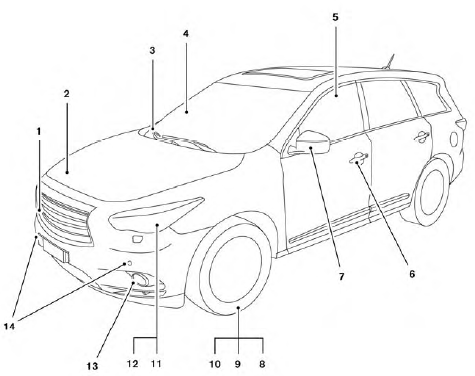
1. Front camera (if so equipped) (P. 4-36)
2. Engine hood (P. 3-22)
3. Windshield wiper and washer switch, wiper blades (P. 2-26, 8-18)
4. Windshield-washer fluid (P. 8-18)
5. Power windows (P. 2-51)
6. Door locks, INFINITI Intelligent Key, Remote Engine Start (if so equipped), keys (P. 3-5, 3-7, 3-20,3-2)
7. Mirrors, side camera (if so equipped) (P. 3-31, 4-36)
8. Tire pressure (P. 9-11)
9. Flat tire (P. 6-2)
10. Tire chains (P. 8-38)
11. Replacing bulbs (P. 8-26)
12. Headlight and turn signal switch (P. 2-30)
13. Fog light switch (P. 2-35)
14. Corner sensors (if so equipped) (P. 4-40)
See also:
Draining of coolant water
If the vehicle is to be left outside without antifreeze, drain the cooling system, including the engine block. Refill before operating the vehicle.
For details, see “Changing engine coolant” in the ...
Operating tips
• When the selector/shift lever is shifted to the “R” (Reverse) position, the monitor screen automatically changes to the rearview monitor mode. However, the radio can be heard.
• It may take some ti ...
Security systems
Your vehicle has two types of security systems:
● Vehicle security system
● INFINITI Vehicle Immobilizer System ...