
Head restraints (3rd row)

WARNING
Head restraints supplement the other vehicle safety systems. They may provide additional protection against injury in certain rear end collisions. Adjust the head restraints properly, as specified in this section. Check the adjustment after someone else uses the seat. Do not attach anything to the head restraint stalks or remove the head restraint. Do not use the seat if the head restraint has been removed.
If the head restraint was removed, reinstall and properly adjust the head restraint before an occupant uses the seating position. Failure to follow these instructions can reduce the effectiveness of the head restraints. This may increase the risk of serious injury or death in a collision.
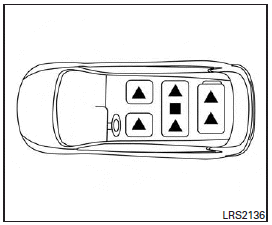
The illustration shows the seating positions equipped with head restraints. The third row head restraints are removable but not adjustable.
Indicates the seating position is equipped with a head restraint.
Indicates the seating position is equipped with an adjustable headrest.
Components
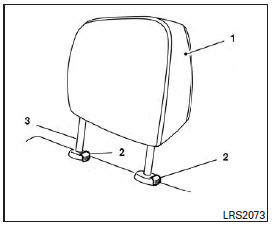
1. Head restraint
2. Lock knobs
3. Stalks
Removal
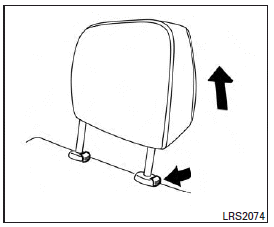
Use the following procedure to remove the head restraints.
1. Adjust the seat or seatback as necessary.
2. Push and hold the lock knob(s).
3. Undo the velcro from the head restraint.
4. Pull the head restraint up until it is removed from the seat.
5. Store the head restraint properly so it is not loose in the vehicle.
6. Reinstall the head restraint and properly adjust the seat or seatback before an occupant uses the seating position.
Install
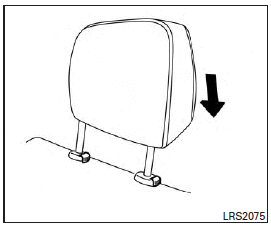
1. Align the head restraint stalks with the holes in the seat. Make sure the head restraint is facing the correct direction.
2. Push the head restraint down until it locks in place.
See also:
Hurry Up? Wait.
The main problem I had with the FX35 was its seven-speed automatic
transmission, which was added in 2009. It hesitates so much when you call for
more power that I have a hard time calling this SUV ...
Emission control information label
Emission control information label
The emission control information label is attached as shown. ...
Center multi-function control panel
Models with navigation system
1. “STATUS” status display button2, 6, 7, 10, 11. For navigation system control buttons (Refer to the separate
Navigation System Owner’s Manual.)3. INFINITI controll ...