
Instrument panel

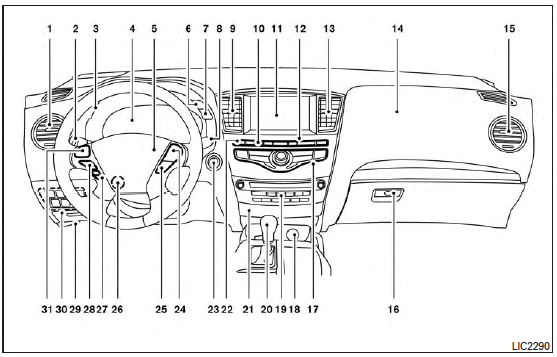
1. Vent (P. 4-52)
2. Headlight/fog light/turn signal switch (P. 2-30)
3. Instrument brightness control (P. 2-34)
4. Meters, gauges, warning/indicator lights and Vehicle Information Display (P. 2-4, 2-7, 2-14)
5. Driver supplemental air bag/Horn (P.1-49, P. 2-36)
6. Back-up Collision Intervention (BCI) system switch (if so equipped) (P.5-29)
7. Twin trip odometer reset switch (P. 2-5)
8. Windshield wiper/washer switch and rear window wiper/washer switch (P. 2-26, P. 2-29)
9. Vent (P. 4-52)
10. Rear window and outside mirror defroster switch (P. 2-30)
11. Center display (P. 4-14, 4-4)/Navigation system* (if so equipped)
12. Automatic heater and air conditioning controls (P. 4-53)
13. Vent (P. 4-52)
14. Front passenger supplemental air bag (P. 1-49)
15. Vent (P. 4-52)
16. Glove box (P. 2-47) 17. Center multi-function control buttons (P. 4-14, 4-4)
18. Power outlet (P.2-42)
19. Audio system controls (P. 4-60)
20. Shift selector (P.5-15)
21. Front passenger air bag status light (P. 1-59)
22. Hazard light switch (P. 2-35)
23. Ignition switch (P. 5-10)
24. Cruise control main/set switches (if so equipped) and Intelligent cruise control main/set switches (if so equipped) (P. 5-46, P.5-48)
25. Distance Control Assist (DCA) system switch (if so equipped) (P. 5-67)
26. Tilt steering wheel control (P. 3-29)
27. Bluetooth Hands-Free Phone System (P. 4-114, 4-128)
28. Steering wheel switch for audio control (P.4-100)
29. Hood release (P. 3-22)
30. Vehicle dynamic control (VDC) OFF switch (P. 2-41)
Heated steering wheel switch (if so equipped) (P.2-40) Headlight aiming control (P. 2-33)
Warning System switch (if so equipped) (P. 2-41)
Power inverter switch (if so equipped) (P. 2-42)
Liftgate release switch (P.3-22)
Power liftgate main switch (P. 3-25)
31. Control panel and Vehicle Information Display switches (P.4-17, 2-15)
*: Refer to the separate Navigation System Owner’s Manual (if so equipped).
See also:
Towing a trailer
Your vehicle was designed to be used to carry passengers and cargo. INFINITI does not recommend trailer towing, because it places additional loads on your vehicle’s engine, drivetrain, steering, braki ...
Troubleshooting guide
Verify the location of all Intelligent Keys that are programmed for the vehicle. If another Intelligent Key is in range or inside the vehicle, the vehicle system may respond differently than expected. ...
Selecting vehicle-to-vehicle distance control mode
To choose the vehicle-to-vehicle distance
control mode1 , quickly push and release
the MAIN switch A . ...