
Panoramic sunshade (if so equipped)

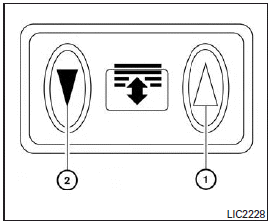
The panoramic sunshade operates when the ignition switch is in the ON position. The sunshade switch is located near the roof console. When opening or closing the sunshade the switch need not be held.
To open the sunshade:
● To fully open the sunshade, push the switch 1 toward the open position.
To close the sunshade:
● To fully close the sunshade, push the switch 2 toward the close position.
WARNING
● To avoid personal injury, keep your hands, fingers and head away from the sunshade arm, the arm rail and sunshade inlet port.
● Do not allow children near the rear sunshade system. They could be injured.
● Do not place objects on or near the rear sunshade. This could cause improper operation or damage it.
● Do not pull or push the rear sunshade.
This could cause improper operation or damage it.
CAUTION
● Do not place objects (such as newspapers, handkerchiefs, etc.) on the sunshade inlet port. Doing so may entangle these objects in the sunshade when it is extending or retracting, causing improper operation or damage to the sunshade.
● Do not push the sunshade arm with your hands, etc., as this may deform it.
Improper operation or damage to the sunshade may result.
● Do not put any object into the sunshade inlet port as this may result in improper operation or damage the sunshade.
● Do not hang any object on the arm rail as this may result in improper operation or damage the sunshade.
● Do not forcefully pull the sunshade. Doing so may elongate the sunshade. Improper operation or damage to the sunshade may result.
See also:
Gasoline containing oxygenates
Some fuel suppliers sell gasoline containing oxygenates such as ethanol, MTBE and methanol with or without advertising their presence. INFINITI does not recommend the use of fuels of which the oxygena ...
Air fresheners
Most air fresheners use a solvent that could affect the vehicle interior. If you use an air freshener, take the following precautions: . Hanging-type air fresheners can cause permanent discoloration w ...
Heated front seats (if so equipped)
WARNING
Do not use or allow occupants to use the seat heater if you or the occupants cannot monitor elevated seat temperatures or have an inability to feel pain in body parts that contact the seat. ...