
Locking with power door lock switch

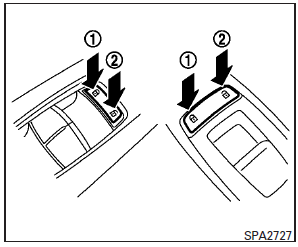
To lock all the doors without a key, push the door lock switch (driver’s or front passenger’s side) to the lock position 1 . When locking the door this way, be certain not to leave the key inside the vehicle.
To unlock all the doors without a key, push the door lock switch (driver’s or front passenger’s side) to the unlock position 2 .
Lockout protection
When the power door lock switch is moved to the lock position and any door is open, all doors will lock and unlock automatically. With the Intelligent Key left in the vehicle and any door is open, all doors will unlock automatically and a chime will sound after the door is closed.
These functions help to prevent the Intelligent Key from being accidentally locked inside the vehicle.
See also:
Engine oil and oil filter recommendation
Selecting the correct oil
It is essential to choose the correct grade,
quality, and viscosity engine oil to ensure
satisfactory engine life and performance,
see “Capacities and recommended fuel ...
Liftgate position setting
The liftgate can be set to open to a specific height by performing the following:
1. Open the liftgate using the request switch or the Intelligent Key.
2. Pull the liftgate down to the desired p ...
To protect your vehicle from corrosion
► Wash and wax your vehicle often to
keep the vehicle clean.
► Always check for minor damage to the
paint and repair it as soon as possible.
► Keep drain holes at the bottom ...