
Servicing air conditioner

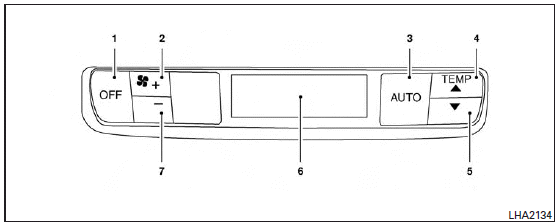
1. OFF button
2. Fan speed increase (+) button
3. AUTO button
4. Temperature increase (  )
button
)
button
5. Temperature decrease (  )
button
)
button
6. Display
7. Fan speed decrease (-) button
Rear control buttons:
The rear seat passengers can adjust the rear automatic air conditioning system using the control switches at the rear of the center console.
The rear control buttons do not function when the rear air conditioner screen is shown on the front display. To activate the rear control buttons, press the REAR button on the front air conditioner control panel and switch the screen on the front display.
OFF button: Turns rear automatic air conditioning system off.
Fan speed increase and decrease buttons: Adjusts the rear fan speed up or down.
AUTO button: Turns rear automatic air conditioning system on, AUTO mode on.
Temperature increase and decrease buttons: Adjusts the rear temperature up or down
The air conditioner system in your INFINITI vehicle is charged with a refrigerant designed with the environment in mind.
This refrigerant does not harm the earth’s ozone layer.
Special charging equipment and lubricant is required when servicing your INFINITI air conditioner.
Using improper refrigerants or lubricants will cause severe damage to your air conditioner system. See “Air conditioner system refrigerant and oil recommendations” in the “Technical and consumer information” section of this manual.
An INFINITI retailer is able to service your “e
WARNING
The air conditioner system contains refrigerant under high pressure. To avoid personal injury, any air conditioner service should be done only by an experienced technician with proper equipment.
See also:
Cigarette lighter and ashtrays (if so equipped)
Cigarette lighter and ashtrays (if so equipped) ...
Music Box® (if so equipped)
Recording:
• Note that data that is lost and not stored to the hard drive/flash memory due to system damage, improper operation or malfunction is not under warranty.
• Vehicle owners are not permitt ...
How to use remote keyless entry system
When you lock or unlock the doors or the trunk lid, the hazard indicator will flash and the horn (or the outside chime) will sound as a confirmation. For details, see “Setting hazard indicator and h ...