
Compact disc (CD) player (modelswithout Navigation System)

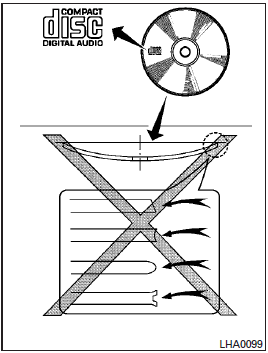
CAUTION
● Do not force a compact disc into the CD insert slot. This could damage the CD and/or CD changer/player.
● Trying to load a CD with the CD door closed could damage the CD and/or CD changer.
● Only one CD can be loaded into the CD player at a time.
● Only use high quality 4.7 in (12 cm) round discs that have the “COMPACT disc DIGITAL AUDIO” logo on the disc or packaging.
● During cold weather or rainy days, the player may malfunction due to the humidity.
If this occurs, remove the CD and dehumidify or ventilate the player completely.
● The player may skip while driving on rough roads.
● The CD player sometimes cannot function when the compartment temperature is extremely high or low.
Decrease/increase the temperature before use.
● Do not expose the CD to direct sunlight.
● CDs that are in poor condition or are dirty, scratched or covered with fingerprints may not work properly.
● The following CDs may not work properly:
● Copy control compact discs (CCCD)
● Recordable compact discs (CD-R)
● Rewritable compact discs (CD-RW)
● Do not use the following CDs as they may cause the CD player to malfunction:
● 3.1 in (8 cm) discs with an adapter
● CDs that are not round
● CDs with a paper label
● CDs that are warped, scratched, or have abnormal edges
● This audio system can only play prerecorded CDs. It has no capability to record or burn CDs.
● If the CD cannot be played, one of the following messages will be displayed.
CHECK DISC:
● Confirm that the CD is inserted correctly (the label side is facing up, etc.).
● Confirm that the CD is not bent or warped and it is free of scratches.
PRESS EJECT:
This is an error due to excessive temperature inside the player. Remove the CD by pressing the EJECT button. After a short time, reinsert the CD. The CD can be played when the temperature of the player returns to normal.
UNPLAYABLE:
The file is unplayable in this audio system (only MP3 orWMA(if so equipped) CD).
See also:
Owner’s Manual/Service Manual order information
Genuine INFINITI Service Manual for this model and prior models can be purchased.
A genuine INFINITI Service Manual is the best source of service and repair information for your vehicle. This manual ...
Automatic drive positioner (if so equipped)
The automatic drive positioner system has three features:• Entry/exit function (Automatic Transmission Sedan models)• Seat synchronization function• Memory storage ...
Blind Spot InterventionTM system operation
If the radar sensors detect vehicles in the
detection zone, the BSW/Blind Spot InterventionTM
indicator light located inside the
outside mirrors illuminates. If your vehicle
is approachi ...